How to use CAPTIONCLASSTRANSLATE in Dynamics NAV
Not long ago I stumbled upon a question on the popular NAV forum dynamicsuser.net. The question was “What is the use of CAPTIONCLASSTRANSLATE command in NAV?”. There was only one answer coming from one of the most influential experts in the NAV world, Luc Van Vugt, but his answer intrigued me even more. As msdn was not very helpful, I started digging into this function use.
First, I wanted to see where is used in standard NAV 2017 in the Cronus database. To find all occurrences of CAPTIONCLASSTRANSLATE in standard NAV I used the Object Manager produced by idyn , a NAV AddOn for managing C/AL code. For my readers that do not have access to this development tool, export all objects to a text file and search in the file for “CAPTIONCLASSTRANSLATE”.
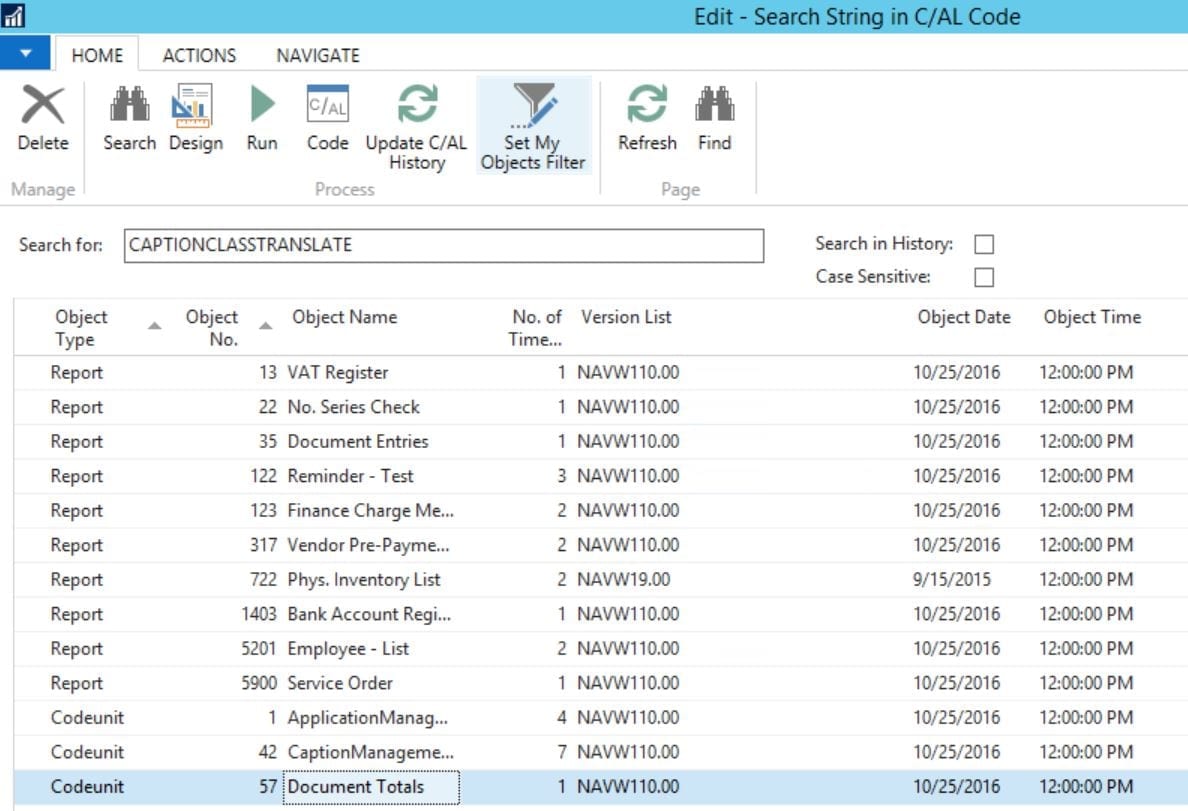
First occurrence was in report 13, VAT register:
 The report is using the command CAPTIONCLASSTRANSLATE to populate the value of a control(VATEntryClosedCaption) with the caption of “VAT Entry”.Closed field.
Similarly, CAPTIONCLASSTRANSLATE is used in report 22 “No. Series Check”, report 35 “Document Entries”, report 122 “Reminder - Test”, report 123 “Finance Charge Memo - Test”, report 1403 “Bank Account Register”, report 5900 “Service Order”.
A more intriguing way of using the command CAPTIONCLASSTRANSLATE is found in the other objects as following:
The report is using the command CAPTIONCLASSTRANSLATE to populate the value of a control(VATEntryClosedCaption) with the caption of “VAT Entry”.Closed field.
Similarly, CAPTIONCLASSTRANSLATE is used in report 22 “No. Series Check”, report 35 “Document Entries”, report 122 “Reminder - Test”, report 123 “Finance Charge Memo - Test”, report 1403 “Bank Account Register”, report 5900 “Service Order”.
A more intriguing way of using the command CAPTIONCLASSTRANSLATE is found in the other objects as following:
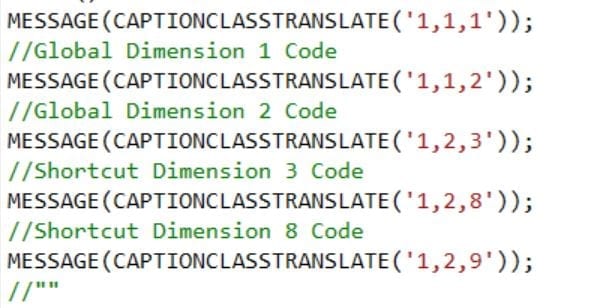
 As we can see above, CAPTIONCLASSTRANSLATE receives a string parameter consisting of three sub-strings separated by two commas.
CAPTIONCLASSTRANSLATE(‘i,j,k’)
By investigating the code in Codeunit 42 “CaptionManagement” and Codeunit 57 “Document Totals” I could draw the following conclusions:
If i = 1 then CAPTIONCLASSTRANSLATE will output Dimension codes.
If j = 1 then CAPTIONCLASSTRANSLATE will output Global Dimensions code.
If k = 1 (i=1,j=1) then CAPTIONCLASSTRANSLATE will output “Global Dimension 1 Code”
If k = 2 (i=1,j=1) then CAPTIONCLASSTRANSLATE will output “Global Dimension 2 Code”
If i = 1 and j = 2 then CAPTIONCLASSTRANSLATE will output Shortcut Dimension Codes(for k=1..8).
As we can see above, CAPTIONCLASSTRANSLATE receives a string parameter consisting of three sub-strings separated by two commas.
CAPTIONCLASSTRANSLATE(‘i,j,k’)
By investigating the code in Codeunit 42 “CaptionManagement” and Codeunit 57 “Document Totals” I could draw the following conclusions:
If i = 1 then CAPTIONCLASSTRANSLATE will output Dimension codes.
If j = 1 then CAPTIONCLASSTRANSLATE will output Global Dimensions code.
If k = 1 (i=1,j=1) then CAPTIONCLASSTRANSLATE will output “Global Dimension 1 Code”
If k = 2 (i=1,j=1) then CAPTIONCLASSTRANSLATE will output “Global Dimension 2 Code”
If i = 1 and j = 2 then CAPTIONCLASSTRANSLATE will output Shortcut Dimension Codes(for k=1..8).
 For printing field captions that have (LCY) in caption use i = 101.
For example to display Amount(LCY) use CAPTIONCLASSTRANSLATE like below:
For printing field captions that have (LCY) in caption use i = 101.
For example to display Amount(LCY) use CAPTIONCLASSTRANSLATE like below:
 To display captions of amount fields that contain the text “Incl. VAT” or “Excl. VAT” use CAPTIONCLASSTRANSLATE with i =2 and j = 0 (to display Excl. VAT) or j = 1 (to display Incl. VAT) as in the examples below:
 All examples of CAPTIONCLASSTRANSLATE found in NAV standard were in reports and used to display captions in the table headers or group totals in report layouts.
Still on NAV? I move NAV and C/AL code to Business Central, and I check your code first so you know what to expect. NAV to BC migrations →